TL;DR - The numbers in my source file do not equal what is shown in Alteryx, and I don't like it.
End goal:
I have field that contains 20 character alphanumeric (but predominantly numeric) ID values that I import from an XLSX file that I need to export to a CSV in standard notation (not scientific notation).
Current Progress:
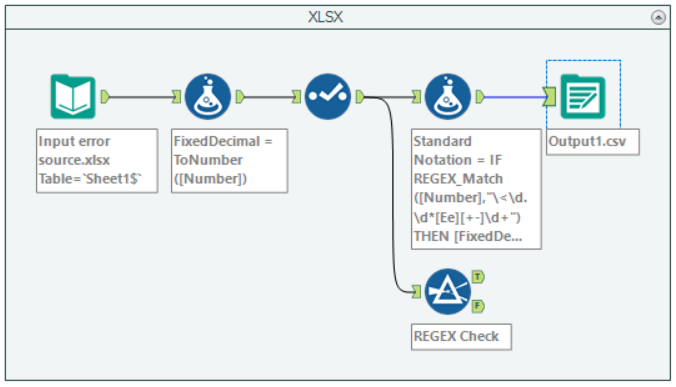
I have been able to convert the scientific notation to standard notation using ToNumber() in a Formula tool with a FixedDecimal data type.
I bring the ID values with alpha characters back in by creating a new field that pulls the FixedDecimal for records that originally were in scientific notation, and pulling in the original values of the IDs that have alpha characters (and were truncated by using ToNumber).
Problem:
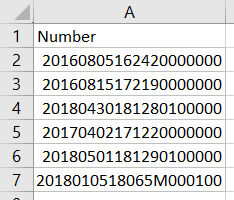
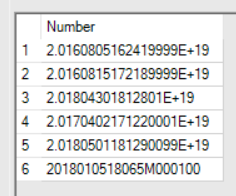
In the source file, the ID field is shown in full, with no scientific notation. However, it shows up as a V_String field with scientific notation in Alteryx with several digits at the end differing from the source file. This has been disconcerting, making me wonder what sort of other changes have been made that I'm not aware of.
Constraint:
While saving each tab of the XLSX file as a CSV to use in the input does work as a temporary workaround, it will not work as a long-term solution. In case it helps in isolating the issue, I did notice that the numbers had the same translation error when the correct ID numbers (V_String) from the CSV file were converted to a numeric type.
Example:
Notice the difference in values:
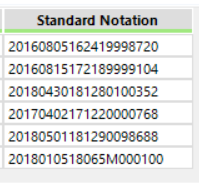
Source file --> Input Preview --> Output
The first value is originally 20160805162420000000, but ends up as 20160805162419998720 (and part of that change can be seen in the input preview with scientific notation).
Workflow (also attached):