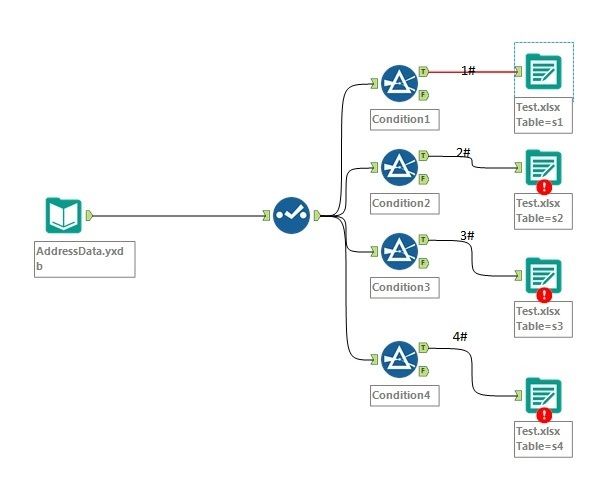
I just create a sample image as above to illustrate my question. As shown in the image, my data are split into 4 sheets (s1, s2, s3 and s4) and "Output Options" are all set to "Overwrite Sheet (Drop)". All outputs are contained by file Test.xlsx.
When I run the workflow, only s1 completed. Other 3 sheets are in error "
Error: Output Data (10): Unable to open file for write: ..\Test.xlsx Error Opening file: ..\Test.xlsx: The process cannot access the file because it is being used by another process. (32)".
However, if I only keep connect 2# and break other connections, then run the workflow. s2 can be done correctly. I can also do this on connect 3# and 4# separately, all of them are succeed.
Is there any way to produce my output sheets at the same time rather than run the workflow one by one?


