@hhaigh1 had a great post at ... https://community.alteryx.com/t5/Alteryx-Knowledge-Base/Apply-Column-Rules-to-Multiple-Columns-in-the-Table-Tool/ta-p/76996 for formatting dynamically changing columns!
This is a great trick, but now I'm trying to apply it to be able to format the cell background colors conditionally based on their values, and yet do it on dynamically changing week dates. An example would be...
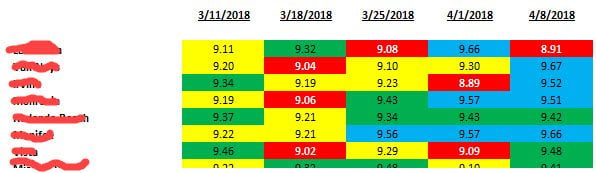
...where, for example, the color should be RED if less than 9.1, YELLOW if between 9.1 and 9.3, etc.
I deselect the columns and then set a Column Rule where..."IF ToNumber([_CurrentField_]) < 9.1 THEN 1 ELSE 0 ENDIF" (with the Background Color coded as RED).
I assume I should be using the "CurrentField" variable (since it is dynamic) and I'm setting it to either 1 or 0, where I believe what should happen is if it is 1, then the color I pick will apply. What I found was to avoid an initial error, I needed to convert the "CurrentField" to a number.
I go back and reselect my columns (which does apply the Column Rule to each weekly column), but now when I run it, I'm getting an error on the Table..."String variable switched type".
Any thoughts on how to get my columns to conditionally format on value but dynamically (since the weeks change)?
Thanks,
Rod


