How do I remove invalid characters from an Excel filename using RegEx.
I.E. I don't understand how to populate the Regular Expression field.
Thank you.
Brian
Can you show the example that you're dealing with and what specific character's you're trying to remove?
-Jay
Can you give us an example? Not sure I understand the need - why would there be invalid characters?
Same idea @jrlindem ! 😂
Great minds think alike @alexnajm 😁
If you know the specific characters you want to remove, try the ReplaceChar function.
Example
ReplaceChar("abcdefb", "b", "") returns "acdef".
https://help.alteryx.com/current/en/designer/functions/string-functions.html
Chris
Hello @BGeregach That's a great question, as it is important to get file names correct. When you say "invalid characters" do you mean characters such as a ":" appearing in the middle of your string, or are you referring to characters that aren't recognised, i.e appear as a blank box or another unusual character?If you are referring to the first option, a Replace() function can often be more useful than regex in this case, @ChrisTX has provided a good example of its behaviour above.If by invalid characters you mean unrecognised characters, then you can use the following Regex:REGEX_Replace([Field], "[^ -~ ]", "")I learnt this from @binu_acs' reply to the following thread: https://community.alteryx.com/t5/Alteryx-Designer-Desktop-Discussions/Working-with-non-Ascii-character/td-p/1022508What this function does is it defines what's called a character set. In Alteryx, Regex is based on the ASCII alphabet. Each character in the ASCII alphabet has an ID, so by defining a range (using the "-"), you can tell Alteryx to only accept characters between the space " " and the tilde "~". (see ASCII alphabet below)
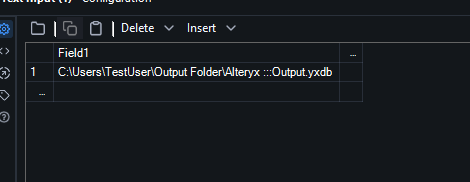
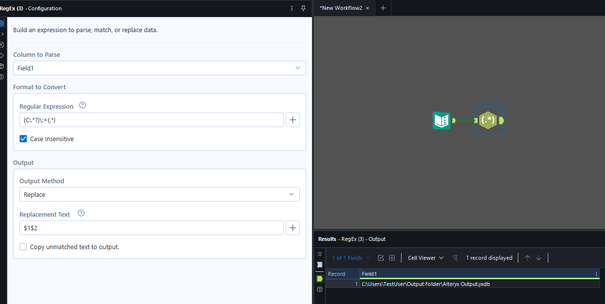
The regex expression above includes the "^" symbol, which means NOT in. So the regex looks for any characters NOT in between the " " and "~", then replaces these unknown characters with nothing. @binu_acs included an example of this in his original post linked above.One final note, if you are trying to figure out a regex expression, I would highly recommend a site like Regex 101. It allows you to see which part of your regular expression, are matching with which parts of your string. Here is an example where I used Regex to remove ":" from the middle of my file path:
Once you have your expression in regex 101, you can copy it into the regex or formula tool in Alteryx. Here is the before and after the regex tool in Alteryx:Before:
After: (the $1 and $2 refers to the "groups", defined by the sections of the regex expressions found within brackets)
I hope this all makes sense & helps you solve your problem, but please let me know if you have any further questions.Regards - Pilsner
To all that have replied, I thank you.
I'm hesitant to provide examples with real world data. So I'm going to do my best to explain what I am working on.
I have a master file of data. In this file is a column of Report Names. My process goes through and creates an excel file with multiple tabs for each pivot table the client wants. The name of the output file is the name of the report. The client has used characters like: : / \ < > * " (this is not an exhaustive list).
I was hoping to use one RegEx tool to handle these characters (I'm replacing each one with a space) so that i don't need to create multiple formula's with Replace or Replacechar. I am using Replace or Replacechar, I just wanted to exchange a bunch of those for one RegEx tool.
I hope this helps.
Thank you,
Ah, so you have the report names in a columnar arrangement in a report. That means you can use a lot of the techniques from others in this thread to clean those field values up, but also... the Cleanse Tool can pull out the special characters from your data as well and then you can pass those values downsteam.
And of course for machine characters or non-traditional symbols, REGEX or Replace() functions would be great to use.