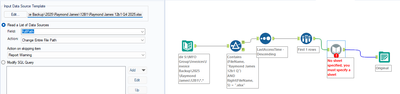
I keep receiving no sheet selected error on my dynamic input tool. I have definitely chosen a sheet though. Has anyone else encountered this problem?
Specifying the sheet name in your template file isnt necessarily specifying the sheet name for the file that gets opened by the dynamic input.
If the file only had one sheet, it would still open even if the sheet name was different. If there are multiple sheet names in the file though, you get this message. Since you are replacing the entire path in your dynamic input, you need to give it a path that also contains the sheet name you want to open.
Use a formula tool and you can update the full path column to be [FullPath]+"|||Original" and feed that to the dynamic input and it should work.
Agree with @SPetrie You do need to have an initial sheet specified for the template, even if you are completely over-writing that for your workflow. -Jay
Where do I specify the sheet? I thought I did that here:
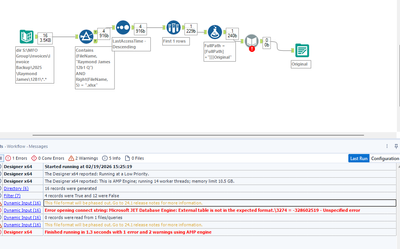
This is what I tred but I seem to be getting a new error now.
For your first question, the sheet you are specifying there is where the dynamic input tool should look to get a general idea of the type of file you are opening, The full path is where the sheet name gets specified.
For the error, that is odd. I see where you are filtering to files with .xlsx in the file name, but the error are warning I see are usually associated with opening older .xls files.
Were these files converted from the older format or were they always xlsx files?
You can also put a $ after the sheet name in your formula as it likes that at times. [FullPath]+"|||Original$"
Assuming that all sheets you are trying to open are called Original with that formula as well.
It looks like your configuration is correct, but I'm not sure based on your screen shots if you selected the "Original" sheet from the file itself or you typed that in after the fact. Your template should have the sheet and when you select it as the Connection Type > File; then once you drag in the Excel Template, you would pick the right sheet in the pop-up.
Maybe this is already what you're doing?