Hello dear community, I was wondering if you had any ideas on the below.
I have a dataset that is the output of a Microsoft Form survey. The responses on the survey can be grouped on a main field, in my mock data that's the "Hobby" field. The questions on the MS Form are based on what the value for "Hobby" is. As a result, depending on Hobby, there are lots of completely empty columns:

I want to chop up the above and output it into multiple output files, one per each hobby.
I have come up with a low-tech solution, namely filter for each hobby, add a Cleansing tool to remove the null columns, then output each:
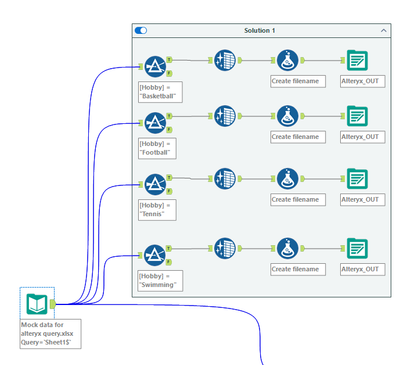
This results in nice clean data per Hobby, e.g. for Basketball the output is -

In trying to do it more dynamically/better, I came across a combination of using an Auto-field tool which automatically puts all null columns into Boolean type, followed by a Dynamic Select tool in which I deselect Boolean fields. I hoped this would give me the results of Solution 1 but it doesn't.
Does anyone have any bright ideas on how I could achieve removing null columns, per category ("Hobby") and then output those in separate files per "Hobby"?
Packaged workflow with mock data attached.
Any ideas extremely gratefully received - and thank you so much for reading!


