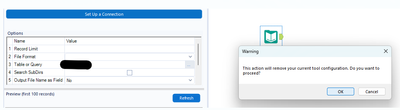
I keep getting this message after the new Alteryx update when I try to change the input. How can I disable it where if I want to just change the file and keep the same configurations, the previous setting stays like it did in the previous version.
Hi @Farriyajawed,
I encountered this message when I click on the option Use Data Connection Manager (DCM) in the Input Data tool configuration after selecting a file, so there is a chance it might be related to that. To make DCM optional, can you follow these steps and see if it solves your problem?
1. Navigate to Options > Settings > Edit User Settings.2. In General tab, scroll down until you can see the option Override DCM Settings.3. Enable Override DCM Settings and change the DCM Mode to DCM Optional. SDK Access Mode can be left as it is.
I agree with @NeoInfiniTech that avoiding DCM for File Inputs is useful. Give that try and report back if that doesn't help. More context around what file type you're using, etc. would be good too. -Jay
Thank you! That worked! one other issue I am having is the drag and drop is not accepting any files. Is this something where I might need to change a setting as well?
I am able to drag and drop on the canvas and also able to select a file but I can't use this feature.
@Farriyajawed that's an odd one. I don't think any settings should prohibit that. I would recommend opening up a support ticket. Especially since, I think you said, you are having just updated your Alteryx version? Otherwise, you could also field this question as a new post so more people see it. Tacking it onto this one is hard to get visibility since it's a resolved post.-Jay
Thank you.