Hello,
The Situation: I have ReportABC and ReportXYZ that I am performing various reconciliations between. Both reports have multiple tabs. I know what I'm doing, so I have batch macros set up for each to deal with the multiple tabs. I am performing various mappings, comparison, analysis, and using the Blob tool to output the final results into a nicely formatted Workbook template.
The Problem: What I would like to do is be able to have a copy of the exact input tabs from the two reports, lets say 4 a piece, input into the final report alongside my Alteryx/blob produced outputs. These tabs won't be referenced by formulas or anything in any way, they would just be there for visual confirmation/sanity checks back to the original data. It would be great if formulas came along however breaking links and pasting values would be a concession I am willing to make. Let me run through the various methods one might try and why they either don't do what I want, require additional work, or I can't figure out how to get it to work and could use some help:
The Ideas:
1. Use a batch macro and write each tab to the Blob output - Unfortunately, Alteryx touching this data at all ruins the whole point of it being an untouched, exact recreation of the original input.
2. Compile all of the data into a nice extract with fields to identify its source - I am already doing this, but again, I want the original reports.
3. Use the blob tool itself so the formatting doesn't get ruined - This doesn't work because I am using the blob for the main report outputs. One of the two would get overwritten, no matter how you set up the Block Until Done.
4. Incorporate the original report tabs into your existing blob setup - This is the closest to working. I have empty copies of each of the 8 tabs in the Blob Template and a macro that does absolutely nothing but input them from their source, and output to the Blob. The issue I run into here is that it means formulas don't carry over, the numbers get formatted as text since the report does not contain headers in the first row (or any row) consistently, and the report columns change enough that the static formatting in the template doesn't always make sense with what actually gets output. In theory, I could conditional format the hell out of these tabs, but at that point I'd rather just record a bunch of excel formatting macros and run those.
5. Run Command - This is where I start to get out of my depth, but from my understanding, Run Command can move whole workbooks, but can't deal with individual tabs, so I basically run into the same issue as number 3. Run Command cannot extract four tabs from my input and then input them into an existing workbook. I don't even need to be picky with which tabs get input, I'll take them all, but it's the output into an existing file without overwriting that seems to be the issue.
6. Run Command to run VBA Script - From my "research", it seems VBA can move multiple tabs of an excel workbook into an existing one. Even with AI assistance (don't judge), I am not sure how to get a VBA script working and/or trigger it from Alteryx correctly. I'm aware you can configure "Events" to run a command upon successful completion of a workflow which I think could also be useful.
The Visual Aid:
I cannot upload any data or workflows, but I put together this super dumbed down version to better illustrate the goal:
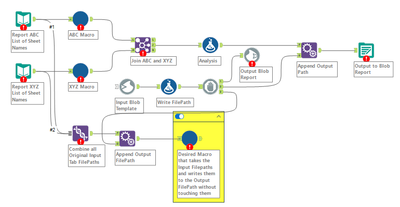
This is a use case I think a lot of us run into, having an exact copy of the source automatically included with the output. I am a fairly experienced Alteryx user but I have never seen a foolproof solution that accomplishes exactly what I want, despite the instructions being relatively simple in theory.
I am capable enough to figure out how to batch macro any solution and make it dynamic for my use case(s), it's just the initial functionality I could use some help with.
Thanks for reading all of this if you made it this far!


