Hello,
I am trying to output to an excel file with multiple tabs.
Each excel tab is saved from a different alteryx workstream thread.
However, this runs into a problem where each thread tries to write the same excel file simultaneously - and then Alteryx throws a "cannot open file" error because file is in use
Error: Output Data (93): Unable to Open archive for zipping: *Filename* Can't open file: *Filename*: The file exists. (80)
See workflow screenshot attached - second thread is trying to write the excel file the same time as first thread (different tab) and errors out.
I know the block until done tool can usually be used (when tabs are being written from one thread)
However, is there a way to do this with multiple threads? I put the block tool in my current workflow (doesn't work as expected) - but the idea is to write the top thread tab first, then the second thread, and so on
Do I have to move the block until done tool early on in my workflow? Would like to avoid this as the beginning has two database pulls which I would like to happen simultaneously.
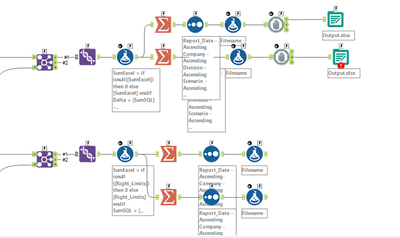
Is there a way to queue up these different "threads" to wait until the previous thread writes the excel tab, to start the next tab write at the writing step?
Thanks!


