I’ve built an Alteryx workflow that:
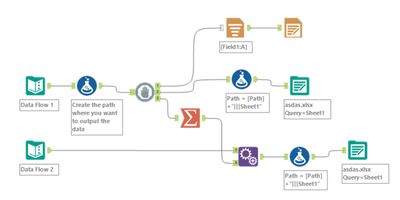
Takes two input datasets and writes them into one Excel file, each on a separate sheet.
To achieve this:
You use a Render tool to create the dynamic output path (with folders based on Year/Month), since Alteryx Output tools can’t create folders.
Then pass data through a macro that:
Writes the first input to the Excel file using Output Tool 1 with the option: Overwrite File (Remove).
Writes the second input to a new sheet in the same Excel file using Output Tool 2 with the option: Create New Sheet.
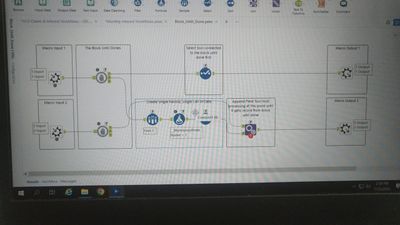
The macro uses Block Until Done tools to enforce correct execution order:
Step 1: Take 1st Input and print it through 1st Output anchor.
Step 2: Without deleting the data from 1st Output, it takes data from 2nd Input Anchor
Step 3: Through 2nd output anchor, it appends/adds to the 1st output with the data of 2nd Output within the same excel file.
- The Core Problem
Despite using Block Until Done, the first Output Data Tool fails, throwing this error:
"Unable to delete Excel file (Make sure the file is writable and not open for writing in another application)"