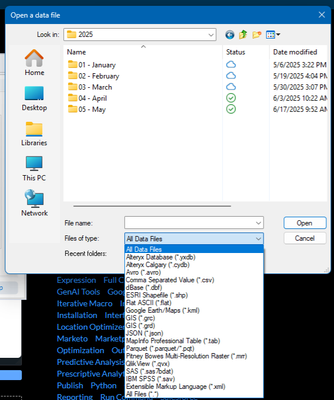
I run a monthly workflow (saved as an analytic app) for which I need to attach 11 Excel files individually. Recently Alteryx has started defaulting to "All Data Files" for file type when browsing to connect the Excel file inputs, but this causes my Excel files to not appear.
My Excel files are saved in the standard .xlsx format. I can get them to appear be selecting All Files (".") in the dropdown as shown in the screenshot below, but this is a pain to do for every input. I've poked around in Designer's settings, but I can't find a way to set All Files (".") as the default when browsing for inputs.
As a side note, it's a little strange to me that Excel formats aren't even listed in the dropdown, but that's no problem provided I can find a way to default to the All Files (".") option. Thanks in advance!