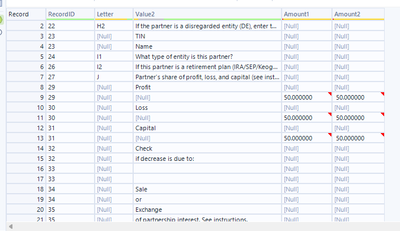
I need to make:
Record 8 and Record 9 to line up. --- "Profit 50.00000 50.00000"
How do I combine Record 14 and 15 in the Value2 column? -- "Check if decrease is due to:"
Hey! Your best options are either the Multi-Row Formula Tool or the Summarize Tool.
This is an example with the Summarize Tool and Action set to Concatenate, with a Separator = a space
Edit: Note, on the Text Input, I didn't put in any Column Headers, which is why you see "Field1", etc. Yours would be your actual column names
@calvincarr29 as you have same reference numbers best way will be using summarize tool to achieve thiselse if this numbers are not present use multi row formula to achieve this.hope this helps.