Hi
Display data and bar chart in an excel file for each agency
Supplied : Workflow, Input Data file , Output File file containing Bar chart
C:\temp\Input-File \ HVC Raw Data-Test.xlsx
C:\temp\Output-File\ ABC Corp.xlsx
COE CORP.xlsx
Bar Chart-ABC Corp.xlsx
Workflow : WorkflowCampaign-Test.yxwz
- When you run the workflow it takes data from the input file and creates two files
- C:\temp\Output-File \ABC Corp.xlsx (See ABC CORP File Below)
- C:\temp\Output-File \COE CORP.xlsx
Agency | Year-Month | Project Count | Sum_Pass | Sum_Fail | Sum_SS | Agency Score Percent |
ABC Corp | 2024/05 | 3 | 23 | | | 100% |
ABC Corp | 2024/04 | 4 | 4 | 9 | 1 | 81% |
ABC Corp | 2024/03 | 4 | | | | 100% |
ABC Corp | 2024/02 | 4 | | | | 100% |
ABC Corp | 2024/01 | 4 | | | | 100% |
ABC Corp | 2023/10 | 4 | 2 | | | 88% |
ABC Corp | 2023/08 | 1 | 2 | 3 | | 95% |
ABC Corp | 2023/07 | 3 | 2 | 8 | 3 | 83% |
ABC Corp | 2023/05 | 2 | | | | 100% |
ABC Corp | 2023/04 | 4 | | | | 100% |
ABC Corp | 2023/03 | 4 | 6 | 20 | | 82% |
ABC Corp | 2023/02 | 4 | 14 | 23 | 3 | 89% |
ABC Corp | 2023/01 | 4 | | | | 100% |
- Take output file ABC Corp.xlsx . Put the above data grid and below bar chart in a excel file .
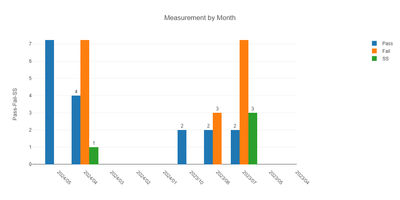
Issues :
- The bar chart is not showing all month’s data in the X-Axis and legends number of Measurements
- Can we omit #2 above and directly create aggregate data and Bar chart at the same time by agency and save the excel file.
Is there any suggestion how to display aggregated data and bar chart at the same time in the excel file.


