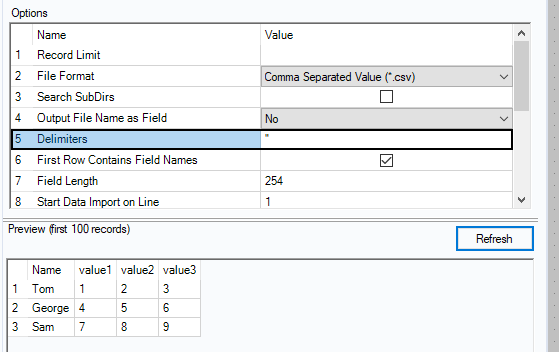
Hello, I have a CSV file that every value is separated by quotes but alteryx is reading the file weird and recognizing it all as one field. See the snippet attached.
i cannot provide sample data.
thank you very much in advance!
Sorry, forgot a bit. Scroll down in the file input and change the ignore delimiters in quotes to be single quotes or auto and give that a shot.
CSV file data comes in one column only,
you have use regex expression to separate the data
try this regex formula REGEX_Replace([Field_1], "\s{2,}","|")
it will add | for every 2 spaces and you can use text to columns
I tried your solution but got this error:
Your example image doesn't seem to have a delimiter specified.
If the data is split by quotes, set that as your delimiter and it should split it for you.
Hello, thank you for your suggestion. I did try that as my very first solution but alteryx gives me an error that states that it cannot use a quote as a field delimiter. See attachment.
Okay, not exactly perfect but that worked good enough! It popped out extra blank columns (see snip) but I can just use the select tool to remove those from my output file.
Thanks
Actually it didnt work out. It's not separating all the data correctly and I'm ending up with values in the wrong columns... for example I'm getting $$ in my Invoice Date field. See attachment
We must be missing something here. I know you said you cant provide sample data, but can you upload a sample file with just the headers? A screenshot of the first few lines of data from notepad or notepad++ or a mock file with a few lines of fake data?
As a check, if you import the file using \0 to use no delimiter, indicate that the first row contains data, and a formula tool to count the number of quotes REGEX_CountMatches([header],'"') does every line have the same number of quotes or are there extras in some lines?