Hello,
While trying to upload a workflow to the Gallery to schedule, I am running into a validation error at the beginning of the control container. The gallery does not recognize the tool. I tried different combinations within the container, and this workflow failed to upload each time. Tool 126 is the select tool.
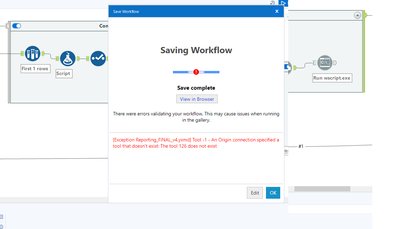
Some troubleshooting I performed before posting here:
Verify Tool Existence: Ensure that tool 126 actually exists within the workflow. It's possible that during some editing, the tool was removed or its ID was changed.
Check Dependencies: If tool 126 is a Select tool as you mentioned, check that all tools that depend on it or provide input to it are correctly configured.
Inspect the XML: Since the error is coming from an XML file (as indicated by .yxmd), you could open the workflow file in a text editor and search for "Tool 126" to see how it's referenced. There might be a node that is pointing to a non-existing tool.
Correct the XML: If you find an incorrect reference in the XML, you can manually correct it if you're familiar with the structure of the workflow file.
Recreate the Tool: If the tool is missing, you might need to recreate it in the workflow and ensure that all connections are properly made.
Any help please or direction on what I should do next!


