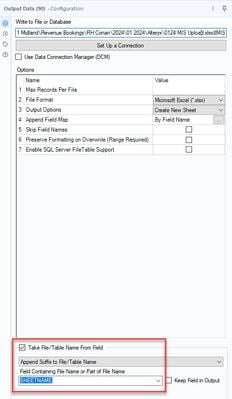
In the output options drop down menu, I pick "create new sheet" and it will export starting at cell A1. Is there a way to export to start at a specific cell like A3?
Thank you.
@AgnesL mention the range where you want to write your output in the output tool
https://community.alteryx.com/t5/Alteryx-Designer-Desktop-Discussions/Output-to-a-specific-range-in-Excel/td-p/383011
@binu_acs Thank you. How should I write the range when the Sheet name is "dynamic"? Also, the range might change each month depending on the sales but I know the fields should be A3:Z3. Would that cause a problem? Thank you.
@AgnesL you can make it dynamic by predefining the FullPath. Sample attached
@binu_acs I couldn't get it to work..... not sure if it is because the "Sheet Name" column is fixed. I have a big data file that needs to split into different sheets with 10,000 records per sheet and I want to export it starting in cell A3. I think the new range column is fixed to "Sheet 1" so it doesn't work?
@AgnesL Can you provide a sample data set and expected output?
Try these settings. You'll want to set the tile tool to the number of files to create. If you are already breaking your data into segments another way (i.e. a field), you can add that to the formula to break up the output files.