Introduction
PrestoDB, commonly referred to as simply Presto, is an open-source distributed SQL query engine. Presto is used by companies like Facebook and Netflix to efficiently query massive data volumes from disparate data sources. Alteryx offers support for Presto with both Designer and the Alteryx Analytics Cloud Platform (AACP). In this blog, we’ll be focusing on the integration with the Alteryx Analytics Cloud Platform specifically.
Integration with AACP
Presto is commonly used in conjunction with a Hadoop cluster and could be deployed in the cloud alongside a technology like Amazon EMR, or on-premises. On-prem deployments are still the most common, and this will be the scenario we focus on in this blog, although the integration with AACP is the same regardless of where Presto is deployed.
An important concept with Presto is that of the “catalog,” which is essentially a data source that Presto is configured to query. As Presto can query a large number of data sources through a single environment, in many ways it can be thought of as a data federation or data virtualization layer. As such, many organizations have chosen to build application integrations into Presto rather than building integrations with each data source they want to query.
This becomes especially interesting with the Alteryx Analytics Cloud Platform being a SaaS cloud-hosted platform, as organizations may not want to open up connectivity to all their data sources. However, with Presto acting as a data virtualization layer, the Alteryx Analytics Cloud Platform could be granted access to Presto, with all the data sources kept private behind additional networking firewall rules. In such a scenario, only the Presto environment would need to be whitelisted to allow the Alteryx Analytics Cloud IP ranges, and the actual data sources would only be accessible through Presto.
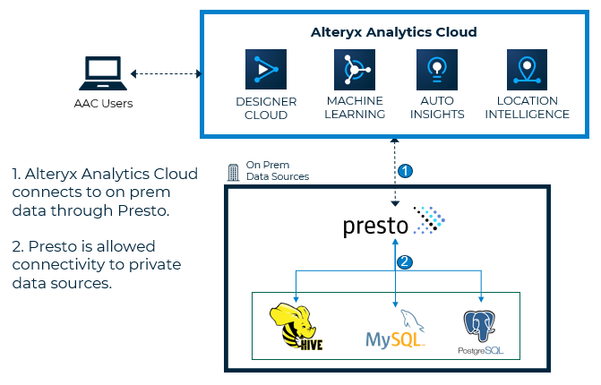
Figure 1 - Example deployment with Presto acting as a data virtualization layer between on-prem data sources and the Alteryx Analytics Cloud Platform.
Creating a Connection and Loading Data
The Alteryx Analytics Cloud Platform enforces a centralized data governance model by providing a single place for defining and sharing data connections. On the Connections page, Admins or those with the Create Connections permission can define a new Connection to Presto.
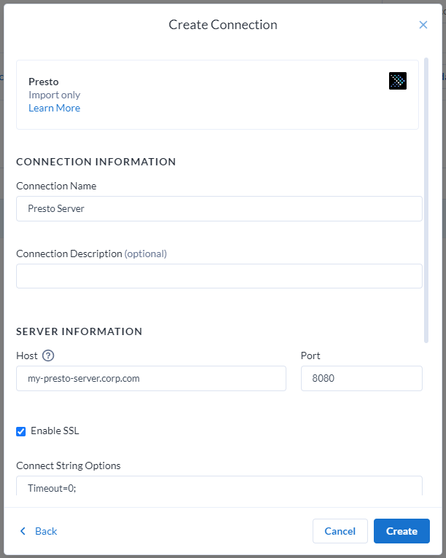
The Create Connections panel allows you to configure the connection details to the Presto environment, including any specific connection requirements. In most deployments, Presto will be configured with LDAP Authentication to validate the user, which is also used to determine what underlying data sources that user has access to.
After creating the Connection, the user can navigate to the Data page to browse Presto for data to work with in Alteryx Analytics Cloud. This is where the configured “catalogs” come into play and are presented to the user based on their auth assignments.
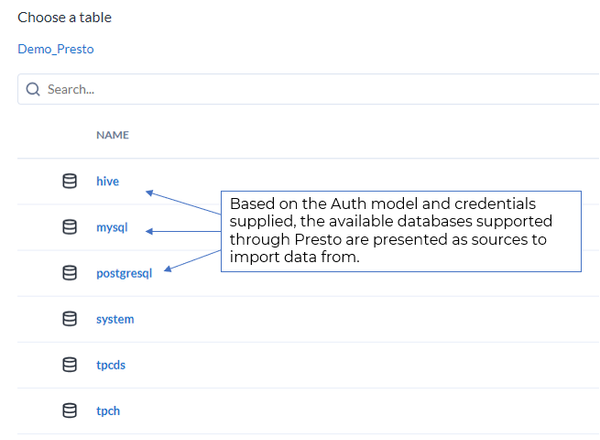
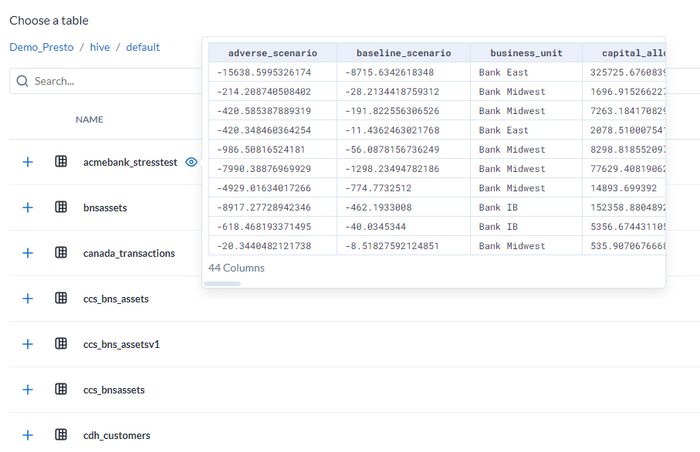
With Presto, the catalog is presented first, then upon selection, you can click into a Schema/Database and ultimately view the list of tables. From this view, a user can preview data and begin to work with the Alteryx Analytics Cloud Platform to solve a business problem.
Final Thoughts
This blog has provided a brief overview of how Presto could be used as a data virtualization layer with the Alteryx Analytics Cloud Platform, providing data and analytic users access to data sources in an efficient manner to a broad range of data sources without having to create connections to each individual data source. You can learn more about Presto and its integration with the Alteryx Analytics Cloud Platform using the resources below:


