Good morning All,
I have data in notepad which I'm unable to split into column wise, column 9 and 10 data is adding to the column 11. How tobfix this. Please suggest. Thanks in advance.
Thanks
NR
You can try this:
Basically, when you input a .txt file into Alteryx, you can read it in one of three ways. In this case, you can read it as a fixed width text file as such:
Since I've packaged it for you, it's easier to use my workflow.
But let's say you wish to use other similar .txt files - you can refer to the XML below on how I delimited it:
<Configuration>
  <Passwords />
  <File OutputFileName="" RecordLimit="" SearchSubDirs="False" FileFormat="21">C:\Users\YOURUSERNAMEHERE\YOURFILELOCATIONHERE\Sample.txt</File>
  <FormatSpecificOptions>
    <TrimWhiteSpace>Unset</TrimWhiteSpace>
    <LineEndStyle>Unset</LineEndStyle>
    <AllowLongLines>Unset</AllowLongLines>
    <CodePage>28591</CodePage>
    <AllowShortLines>Unset</AllowShortLines>
    <FlatFileXML>
      <flatfile version="1">
        <file eoltype="crlf" allowShortLines="t" allowLongLines="t" trimWhiteSpace="t" />
        <fields>
          <field name="Field_1" type="V_String" length="10" />
          <field name="Field_2" type="V_String" length="9" />
          <field name="Field_3" type="V_String" length="25" />
          <field name="Field_4" type="V_String" length="3" />
          <field name="Field_5" type="V_String" length="9" />
          <field name="Field_6" type="V_String" length="2" />
          <field name="Field_7" type="V_String" length="10" />
          <field name="Field_8" type="V_String" length="3" />
          <field name="Field_9" type="V_String" length="15" />
          <field name="Field_10" type="V_String" length="6" />
          <field name="Field_11" type="V_String" length="7" />
          <field name="Field_12" type="V_String" length="5" />
          <field name="Field_13" type="V_String" length="6" />
          <field name="Field_14" type="V_String" length="26" />
        </fields>
      </flatfile>
    </FlatFileXML>
  </FormatSpecificOptions>
</Configuration>
@NiranjanK1
If the above solved your need, kindly like & mark as accepted solution so that you may help others find the solution more quickly + to close the thread as is. Thanks!Best regards,Calvin Tanghttps://www.linkedin.com/in/calvintangkw/
Hi, @NiranjanK1
Another way for you as flat file input:
Awesome alternative as well @flying008 !
@caltang thanks a lot for your solution, but in one notepad I have 3 different column headings, from 50 row I have different headings, from 90th row I have different column headings. How can I spit the data based on row limit. Please suggest
Niranjan
It will be best to have the file provided - that is the best way for us to advise.
@caltang here is the sample input data, which I need to spit into 3. Please suggest
Hmm, this is rather difficult because if what you're telling me is that there are more pages after this, then there will be different delimiters each time. The spacing and tabs will be different, and not consistent.
Before we can give you recommendations, may I ask the following:
Since you asked in this thread for a simple delimited file, and then added on this requirement, I think it is better for you to write a new community post that details the above and close this one since @flying008 and my solution helps in your use case written above.
@caltang thanks for your details
1.we are downloading this data from internal webpage
2. Always we get 3 data streams in one notepad. Pages is no limit
3. We Are getting this data only on notepad
4. All Pages I have to read from notepad
5. I want read all the Information available on notepad
Thanks a lot
Hi @NiranjanK1
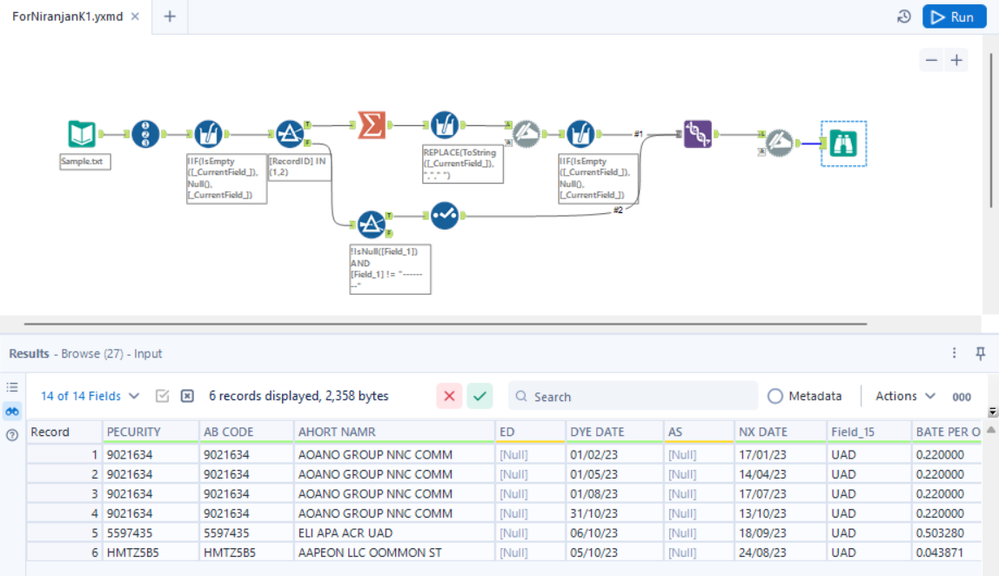
I've cleansed and grouped them up to the Page level as attached.
What needs to be done next is to combine this solution with @flying008 's solution.
@flying008 do you mind exporting your workflow or continuing from where I left off?
@caltang @flying008 actually they are expecting 3 outputs based on different headings
Who do you refer to as "they"? @NiranjanK1
@caltangsorry, I mean end users.
What's table as your want output? 1 or 3 ? Could you please give result as your need ?