Hello,
The scatterplot tools that are a part of my workflow are not working. They throw out a R.exe exit code error. To see if something was wrong with my data, I tried to check the official Alteryx scatterplot example. However, even this example isn’t working and giving the same error upon running the workflow. So, there seems to be nothing wrong with my data as the offiical Alteryx example also isn't working.
I found some more information on this error in the Alteryx Community, and it seems to be experienced by quite a few people. The experts are saying it’s a fake error and can be resolved by ending the R-code with a gc() function. However, I couldn't find appropriate steps to take to go ahead with it.
knowledge.alteryx.com/index/s/article/Error-The-R-exe-exit-code-n-indicated-an-error
community.alteryx.com/t5/Alteryx-Designer-Desktop-Discussions/R-tool-Fake-Errors/td-p/25163
Could someone give step-by-step instructions on how to add a gc() function to the R-code for the Scatterplot tool? I found this part extremely complicated and didn't know how to go about it.
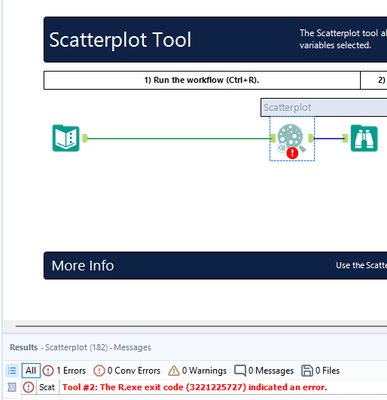
FYI - I use Alteryx on my Mac with Parallels since the Designer cloud platform doesn't have any Data investigation tools yet.
Alteryx version: Admin 2022.1, Predictive tool package for the same version has been installed.


