I'm creating a custom Browse tool similar to the built in In/Out -> Browse tool. Initially I had it behave similar to the Browse tool and pushed data to the UI with the following workflow:
1. Collect data in on_record_batch().
2. In on_complete(), compress the data and save it with self.provider.save_tool_config().
3. In the UI, check for data in the Configuration and decompress and display it.
This worked fine, but I wanted to switch over to using JsEvent("GetInputData") instead. (It allows connections to the custom browse tool to be freely modified, added, or removed, and have the UI update accordingly without needing to rerun the workflow).
The problem is that I have to parse the data myself now, and I can't figure out how to distinguish [Null] values from string values that are literally "[Null]".
For example, consider a Text Input tool with the following data:
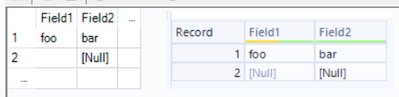
When I use JsEvent("GetInputData") to receive the data, I get:
// console.log(await JsEvent('GetInputData', { anchorIndex: 0, connectionName: '' }))

{
  fields: [
    { strName: 'Field1', strType: 'V_String', nSize: '2147483647', strSource: 'TextInput:', strDescription: '' },
    { strName: 'Field2', strType: 'V_String', nSize: '2147483647', strSource: 'TextInput:', strDescription: '' }
  ],
  numRecs: 2,
  data: [
    ['foo', 'bar'],
    ['[Null]', '[Null]']
  ]
}With non-String types, it's easy to check that "[Null]" means null, but how do I check for String types?


