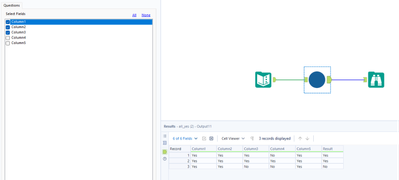
I want to create a new column based on data in many other columns. I have been using the formula tool and creating a new output column with the below conditional and it works:
IF [Column 1]='Yes' AND [Column 2]='Yes' AND [Column 3]='Yes' AND [Column 4]='Yes' AND [Column 5]='Yes' AND [Column 6]='Yes' THEN 'Yes' ELSE 'No' ENDIF
I do this very often with many more columns and I'd like to use the Multi-Field tool for this to get the same result so I can just check the boxes and save the expression rather than manually adding in the column names in the formula tool.
I've been working with the same conditional as a start and with the boxed checked in the configuration box have gotten this far:
IF
([_CurrentField_] = '-')
but I can't bring it all together. Ii'm sure it's simple but I can't figure it out, can anyone give me a hand with this? Also if there's another tool I can use besides Multi-Field that I can use to acomplish this in one step, that would also be a welcome response.