Hi,
we have been trying to get the Platform SDK working, but the tool does not show any UI.
Here are the steps to reproduce on Windows 11.
Install Miniconda and open Anaconda prompt
(base) C:\>conda --version
conda 23.5.2
Create new environment
(base) C:\>conda create -n ayx python=3.8 nodejs=18
Activate environment
(base) C:\>conda activate ayx
Install SDK & CLI
(ayx) C:\>pip install ayx_python_sdk
[...]

(ayx) C:\>pip install ayx_plugin_cli
[...]
Check versions
(ayx) C:\>python --version
Python 3.8.17

(ayx) C:\>pip --version
pip 23.2.1 from C:\Users\Foo\AppData\Local\miniconda3\envs\ayx\lib\site-packages\pip (python 3.8)

(ayx) C:\>node --version
v18.16.0

(ayx) C:\>npm --version
9.5.1

(ayx) C:\>pip show ayx_python_sdk
Name: ayx-python-sdk
Version: 2.2.0
[...]

(ayx) C:\>pip show ayx_plugin_cli
Name: ayx-plugin-cli
Version: 1.1.0
[...]

(ayx) C:\>ayx_plugin_cli version
Alteryx CLI Version: 1.1.0
Create new workspace and tool, generate UI, install it
(ayx) C:\>mkdir myworkspace

(ayx) C:\>cd myworkspace
(ayx) C:\myworkspace>ayx_plugin_cli sdk-workspace-init
Package Name: mypackage
Tool Category [Python SDK Examples]:
Description []:
Author []:
Company []:
Backend Language (python): python
[Workspace initialization] started
[Workspace initialization] .  Create configuration directory
[Workspace initialization] .  Create DCM Schemas directory
[Workspace initialization] .  Create .gitignore
[Workspace initialization] .  Create README.md
[Workspace initialization] .  Initialize backend
[Workspace initialization] Creating C:\myworkspace\backend\ayx_plugins
[Workspace initialization] Creating file C:\myworkspace\backend\requirements-local.txt
[Workspace initialization] Creating file C:\myworkspace\backend\requirements-thirdparty.txt
[Workspace initialization] Creating file C:\myworkspace\backend\setup.py
[Workspace initialization] Creating file C:\myworkspace\backend\ayx_plugins\__init__.py
[Workspace initialization] .  Create tests directory
[Workspace initialization] finished
Created Alteryx workspace in directory: C:\myworkspace
Workspace settings can be modified in: ayx_workspace.json
[Generating config files] started
[Generating config files] .  generate_config_files:generate_config_xml
[Generating config files] Generating top level config XML file...
[Generating config files] finished

(ayx) C:\myworkspace>ayx_plugin_cli create-ayx-plugin
Tool Name: mytool
Tool Type (input, multiple-inputs, multiple-outputs, optional, output, single-input-single-output, multi-connection-input-anchor) [single-input-single-output]: optional
Description []:
Tool Version [1.0]:
DCM Namespace []:
Creating optional plugin: mytool
[Create plugin] started
[Create plugin] .  Create plugin
[Create plugin] Creating Alteryx Plugin...
[Create plugin] Copying example tool to C:\myworkspace\backend\ayx_plugins...
[Create plugin] Added new tool to package directory: C:\myworkspace\backend\ayx_plugins\mytool.py
[Create plugin] finished
[Generating config files] started
[Generating config files] .  generate_config_files:generate_config_xml
[Generating config files] Generating top level config XML file...
[Generating config files] .  generate_config_files:generate_tool_config_xml
[Generating config files] Generating tool configuration XMLs...
[Generating config files] Generating mytool XML...
[Generating config files] Done!
[Generating config files] .  generate_config_files:generate_manifest_jsons
[Generating config files] Generating manifest.json for mytool...
[Generating config files] Done!
[Generating config files] finished
[Generating test files for mytool] started
[Generating test files for mytool] .  Generate tests
[Generating test files for mytool] finished

(ayx) C:\myworkspace>ayx_plugin_cli generate-ui
Tool Name [()]:
[Generating UI component for mytool] started
[Generating UI component for mytool] Unpacking UI components
[Generating UI component for mytool] .  Generate UI
[Generating UI component for mytool] Copying cloned UI tool template
[Generating UI component for mytool] Installing UI components via npm
[Generating UI component for mytool] finished

(ayx) C:\myworkspace>ayx_plugin_cli designer-install
Install Type (user, admin) [user]:
[Creating YXI] started
[Creating YXI] -- generate_config_files:generate_config_xml
[Creating YXI] -- generate_config_files:generate_tool_config_xml
[Creating YXI] .  generate_config_files:generate_manifest_jsons
[Creating YXI] Generating manifest.json for mytool...
[Creating YXI] Done!
[Creating YXI] .  generate_backend_artifact:build_backend_artifacts
[Creating YXI] Creating mypackage.yxi...
[Creating YXI] Creating shiv artifact...
[Creating YXI] [Installing local dependencies]: python -m pip install -r requirements-local.txt --upgrade --target C:\myworkspace\.ayx_cli.cache\dist
[Creating YXI] Updating shiv artifact with new dependencies...
[Creating YXI] [Installing third party dependencies]: python -m pip install -r requirements-thirdparty.txt --upgrade --target C:\myworkspace\.ayx_cli.cache\dist
[Creating YXI] [Compiling shiv artifact]: shiv --compile-pyc --reproducible --extend-pythonpath --site-packages C:\myworkspace\.ayx_cli.cache\dist -o main.pyz -e ayx_python_sdk.providers.amp_provider.__main__:main
[Creating YXI] Created shiv artifact at: main.pyz
[Creating YXI] .  create_yxi:create_yxi
[Creating YXI] finished
[Installing YXI] started
[Installing YXI] .  install_yxi
[Installing YXI] finished
If this is your first time installing these tools, or you have made modifications to your ayx_workspace.json file, please restart Designer for these changes to take effect.
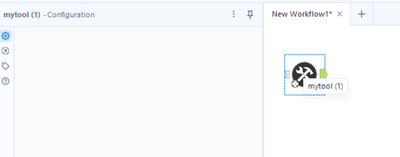
The tool shows up in Alteryx Designer 2023.1.1.123 but it has no UI
What are the minimum steps to create an SDK tool with UI?


