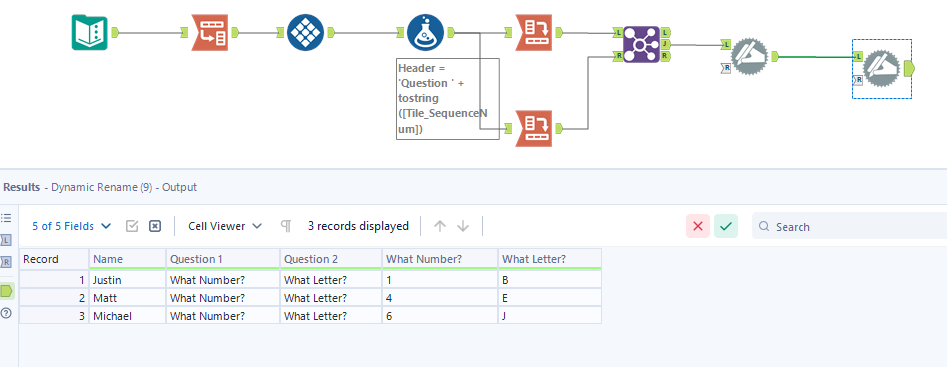
The problem I am having is I need to create an Excel output that would require the least amount of work I would need to do to have it set up and ready for distribution. The request is to create a column prior to another column that will be filled with the question in the header for each row (see example below). The issue is that this needs to be ran multiple times weekly, the questions will be different each time it is run, as will the number of questions for each run so it will need to dynamically determine how many questions there are.
The original file will always be set up the same way with Name being the first column, and followed by ONLY questions for each of the other columns such as this:
| Name | What Number? | What Letter? |
| Justin | 1 | B |
| Matt | 4 | E |
| Michael | 6 | J |
The output will need to skip the first column (Name) but then insert a new column to the left of the answers that uses the header as the fill, so that each row on its own will contain the question as well as the answers. The headers for the new columns will always start with 'Question " and be sequential from left to right starting at one, going to right through however many questions there are. This may range from 2 to 30, so creating formulas every time I get this file has become laborious as the column headers are always the question being asked and I cannot reuse the workflows from file to file. The output should look like this for the above example:
| Name | Question 1 | What Number? | Question 2 | What Letter? |
| Justin | What Number? | 1 | What Letter? | B |
| Matt | What Number? | 4 | What Letter? | E |
| Michael | What Number? | 6 | What Letter? | J |
I have been able to create a header row that has all the correct column names, but cannot figure out how to get the data in it correctly and I also feel that my experiment was unaturally complicated! LOL. Help would be greatly appreciated. Thank you.