Hi,
I am looking to merge three columns into one with the previous column headers in the new column value.
I have attached an input and the desired output for info.
Thanks,
Dan
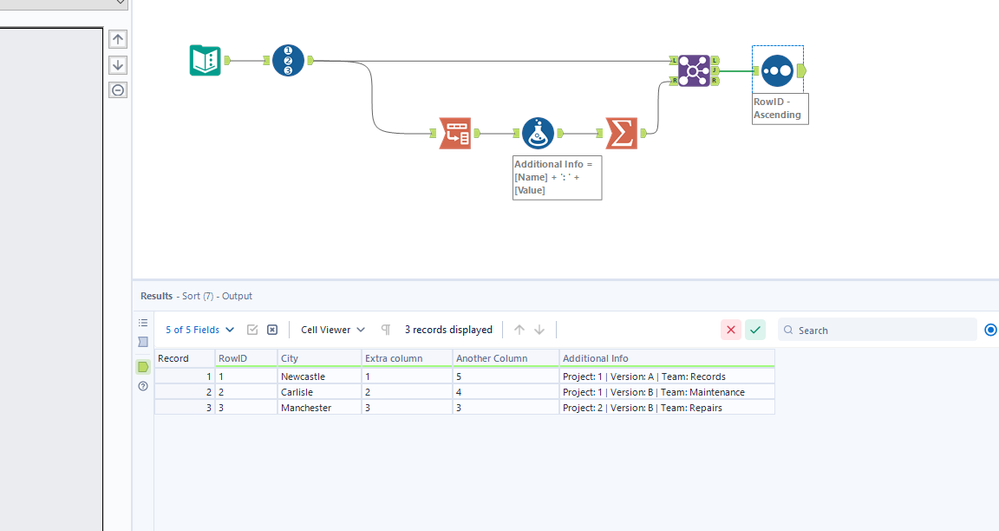
@DanMBrx I see. Trick is to configure the Transpose tool and only select the 3 you want. I'd also advise turning off the Dynamic or Unknown Columns. If your data grows (columns) they will be pulled into the values (that's what happened to me).
Hi @DanMBrx
Here's one way:
Unfortunately I am not able to make this work, the actual spreadsheet I am using has 42 columns, I am only wanting to merge 3 of these columns. The example I included was a "dumbed down" version due to me not being able to upload the actual spreadsheet because of constraints where I work.
@DanMBrx you just need a couple of steps added to @Luke_C 's workflow to be honest:
Before
Hi @BS_THE_ANALYST ,
Unfortunately, this still includes the headings of the additional columns in the value. If you see your output you can see the Extra Columns header in the Additional Info values.
Thanks.
Thank you @BS_THE_ANALYST and @Luke_C , that has done the job