[Unofficial KB]
Issue
After saving a workflow using a SharePoint Files Input tool, you may find that you are unable to re-open the workflow.
The mouse indicator spins indicating it is trying, however the program never finishes responding.
Environment Details
Observed in:
- Alteryx Designer 2022.1.1.42636
- SharePoint Files Input 2.4.0
Cause
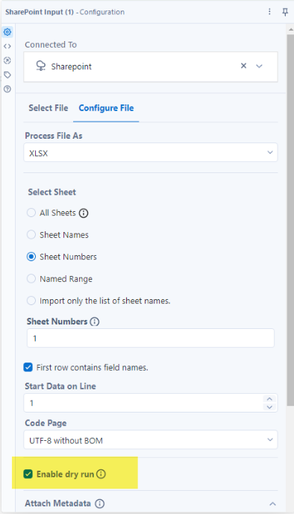
There is a Data Cleansing tool also contained in the workflow and the "Enable Dry Run" option in the SharePoint Files Input tool has not been ticked.
This has been logged as a defect (GCSE-1452) as other input tools do not interact with the Data Cleansing tool in the same way regardless of whether they have the 'Enable Dry Run' option selected or not.
Use of DCM may also be a factor here but this is not currently confirmed as of the date this post was published.
Resolution
In new workflows, ensure the 'Enable Dry Run' option is ticked in the SharePoint Files Input tool configuration before saving.
To recover an existing workflow:
- Open the workflow in Notepad or Notepad++
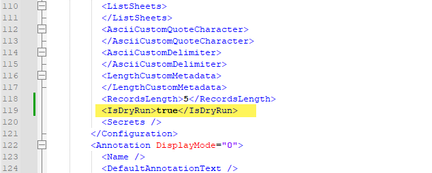
- Scroll to the end of the <Configuration> section under the SharePoint Input tool
- Add this line:
- <IsDryRun>true</IsDryRun>
- Save the change
- Open the workflow in Designer
Jon A | The Information Lab UK


