Hello Alteryx community,
I'm facing below issue in one of my workflows:
Error: Output Data (46): Error SQLPrepare: [MySQL][ODBC 8.0(w) Driver][mysqld-5.7.38-enterprise-commercial-advanced]You have an error in your SQL syntax; check the manual that corresponds to your MySQL server version for the right syntax to use near '' at line 1
This is appearing in the Output Data block. The block was meant to update the MySQL table on our internal database. I am updating a column named primary (based on other fields that are a keys.
(The following paragraph is only a context, thing that gave me an assumption what may cause the issue, not an actual issue. The issue is taking place in Output Data.)
I'm using Alteryx Designer 2019.4. I've noticed, that when I placed my SQL query in Input Data block (where I wanted to take also primary column as an input), I've received the following error:
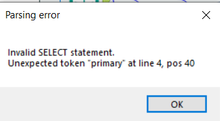
I decided to use Visual Builder then and noticed, that the word primary is written as `primary` (with this ` backquote/backtick/grave symbols).
(End of context paragraph)
However, on Output Data block I have no ability to modify (or even view) the SQL statement and I assume, that this primary field may cause this error (I assume that because the error says something about syntax error.
I have to add, that the primary field is not a primary key (or any key) field, it just stores the information if specific product is our primary product, or no. I also can't change the name of the column, as the column is used in many processes.
Is there any way to modify the SQL on output or do any kind of workaround to update the changes to the table?
Thank you all in advance!


