Hi,
Does anyone know a way to move multiple field names in the 'Per Column Configuration' in the table tool? I want the fields to be in the order that they come into the tool from the upstream feed, but having added new fields (1 per supplier) these are all at the bottom of the per-column config in spite of being sorted with the other supplier specific columns in the select immediately upstream.
When I added the new fields I expected my output to go from

to

but what I'm getting is

The fields are dynamically sorted upstream, so the order that they are in in the select immediately before the table looks like this
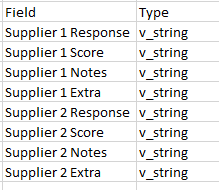
The only way I can find to move the 'Extra' field at the moment involves a lot of clicking in the per column configuration, which would be ok, if there were only going to be a couple of suppliers, but there are going to be 200+ and I need to make sure that the supplier fields are grouped together in the output.
Is there a way to force the table to to use the incoming order? Or am I missing something simple?
Any help would be appreciated.
Thanks
PuffinPanic


