Hi,
Which interface tool would I use to create by user inputting an account # and where would I put it like which tool? Any examples or videos?
I can do the drop down and text box tools, but that doesnt allow to enter an account #
thanks
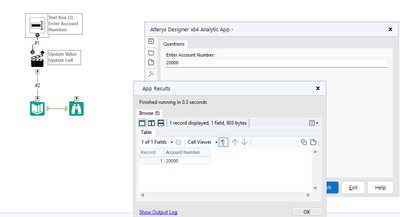
@Hi2023 The Text Box tool should allow the user to enter the account number. Attaching a sample for your referece
It wont open due to newer version
Can I use this tool over a union bc I am joining files at the beginning of my workflow. Also, how do I configure it to select the column account#?
@Hi2023 The below post explains how to open the newer version of workflow in your version
https://community.alteryx.com/t5/Engine-Works/Making-Workflows-Apps-amp-Macros-Backwards-Compatible/ba-p/779546
@Hi2023 When use enter the account number then what is the next action, are the records filtered out based on the Account Number or the Account number is going to save some where?
no, the account # is my unique identifier but I have merged several tabs from excel reports then unioned them all together then I want to add the text box there depending on the account# they want to run
@Hi2023 So basically the user wants to see only their account# details? in that case, after the union tool, you might be using a filter tool for the account#?
I cant because there is TOO many accounts
@Hi2023 Sorry I am still trying to understand your requirement. When the user enter the account# in the text box tool what happens next?
ooh ok, so its only to pull and retrieve that specific filer or account?
@Hi2023 yes, since you have all the account# the user just enter the account# in the text box and with the help of a filter tool all the records belongings to that account number can be extracted
so you cant do this to then run the workflow?
is there a tool that can user can select an account# then it would run it kinda like self service?
@Hi2023 yes, this can be done by chaining the workflow (Chaining analytic app), in the first workflow enter the user account# and run the second workflow. yu will get more idea on chaining workflow in the below post
https://community.alteryx.com/t5/Interactive-Lessons/Chaining-Analytic-Apps/ta-p/243120
No, I dont think thats what I need -I only want to be able to type in an account # and then it run the workflow for that account# only.
I get stuck on how to configure the action tool.
@Hi2023 I was talking about the same. When the user enters the account number he/she only should see the account details. This can be achieved with a filter tool where the action tool should update the account number. If that is what you want I can create a sample workflow for you
oh yes that would be awesome, plz! I would like to see how and the configuration of the action tool
@Hi2023 Attaching a sample workflow, I used the customer id here
But I cant do it a filter for the account ID bc there is TOO many account IDs -I want it to be where they insert their account ID and it runs the workflow that is attached to a excel report.
@Hi2023 I thought one user will be having one account number. Can you upload a sample input file and expected output file for better understanding
Its not letting me attach file
beginning input:
account | name | date
123 Ger 1.1.22
345 Man 1.2.22
567 Jau 1.3.22
once the user inputs account 123 and runs workflow
output
account |name | date
hope this helps