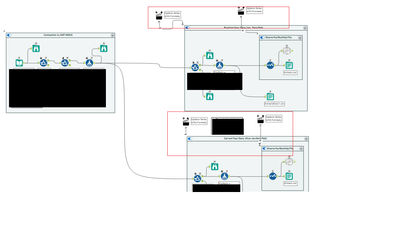
I have a workflow that outputs a monthly file that's overwritten every month and then a daily file that gets saved with a new name each day. I'm controlling the output using 'Action' tools to update the value of the 'Disable' option of the container it's in depending on a formula using
'DateTimeToday()'. This way, the workflow should read the date of when the workflow is executed and control the containers and the output accordingly. There is no separate user input required.
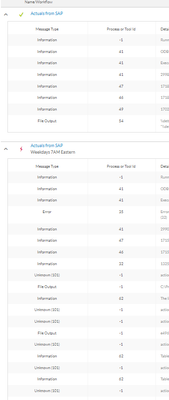
I have this saved as an 'Analytic App' (.yxwz file). All of the container controls using the Action tools work correctly when I click the 'Run as Analytics App' button. When I upload to our company gallery and then manually run the published version, it also works correctly. However, the problem is when I have the same workflow scheduled. The scheduled run seems to ignore all of the Action tools and keeps all containers active. This causes an error because the multiple branches output to the same filename and the Action tools are supposed to control which containers are enabled/disabled. Why is there a difference in Action tool function compared to when I run the workflow manually?
Here's a screenshot of my workflow layout:
Here's a screenshot to show the difference in execution details between the scheduled run and the manual run for the exact same published workflow:
I need the monthly file to overwrite the existing file in a shared network folder and it needs to be run on the first weekday of every month. That kind of custom schedule doesn't appear to be available so that's why I'm trying to control output using the Action tool formula. The daily files are output to keep as logs with the filenames adjusted to include the run date. Please also share if you know a different way of going about this. Thanks.


