Hi,
I'm getting a syntax error that is driving me crazy!
I'm assuming I've done something silly, but can't see what...
Using A Formula Tool, I've created a Boolean column called [Manual Cat] and populated using the code:
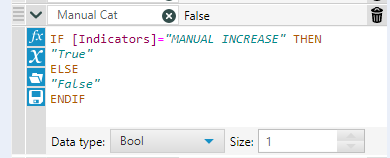
All seems happy as the colours change...
A little later in the workflow, however, I'm trying to use the column to add a new column and adjust the value of an existing column.
I'm using the  button to get the existing columns where appropriate and the formula appear as:
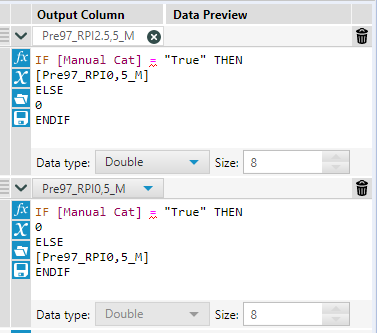
The equals signs are generating the errors:
Formula (234) Parse Error at char(17): Invalid type in operator ==. (Expression #1)
Formula (234) Parse Error at char(17): Invalid type in operator ==. (Expression #2)
and the the "True" and existing columns aren't being recognised so stay in the black font.
What have I done wrong??
I have tried saving the workflow (and then turning Aleryx on and off again...) but no difference.
I can't share the workflow as it is using sensitive data and has more than 220 Tools within it (and counting).
Thanks in advance...


