I am working on a proof of concept to update the configuration of tools using the Update RAW XML with Formula action type from within the action tool and running into problems with using the replace function to locate the existing XML and replace it with my desired XML.
I have created a batch macro with 2 control parameters (Find and Replace). Those control parameters feed into a single Action tool that is using the Update Raw XML with Formula action type, and attempting to update the inner XML for the Input Data tool.
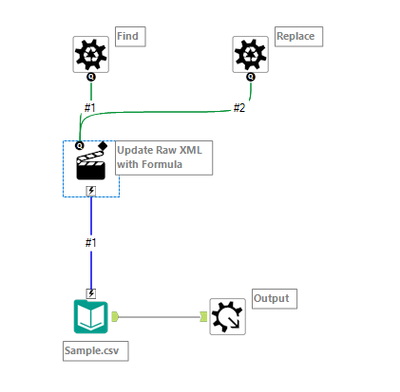
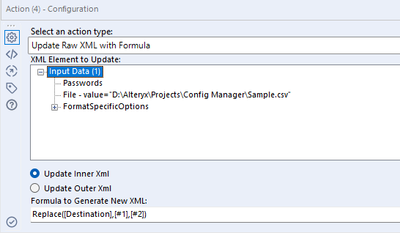
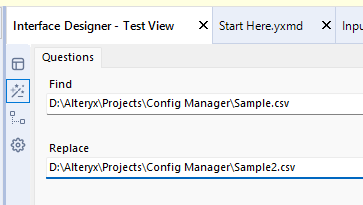
This works when I Find/Replace a single value like the file name
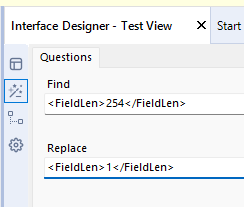
Or a single unquoted attribute like Field Length
However when I try to find a longer string that that includes both the tag and an attribute within the tag, like in this example where I am changing both the record limit and the input file name (note the string was copied directly from the macro's XML opened in Notepad ++)
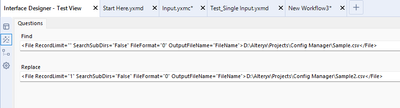
Alteryx appears not to find the string and so the configuration for the input in the macro is not modified. This feels like an issue with the syntax that is being searched for but I have no idea how to determine what the correct syntax should be. Anyone run into this before or have suggestions on how to find and replace large
So with the underlying XML as seen in notepad ++ as:
<File RecordLimit="" SearchSubDirs="False" FileFormat="0" OutputFileName="FileName">D:\Alteryx\Projects\Config Manager\Sample.csv</File>
When I find/replace looking for RecordLimit="" it works
But when I look for File RecordLimit="" it does not work
To get even more specific it works with a single space before record limit ' RecordLimit=""'
But does not work with the "e" from "File" and the space e RecordLimit=""
So I am guessing that maybe there is another character that needs to go around the attribute names found inside of an XML tag (forgive me if I am not using correct nomenclature as I am not an XML person) any suggestions?


