I've been experimenting with the latest version of the SharePoint Tools (v 2.3.0 released in Jan 2023) to open and read a CSV UTF8 file from a Microsoft Teams Channel File section (i.e. location is SharePoint) and am seeing some strange behaviours:
Tool: SharePoint Input
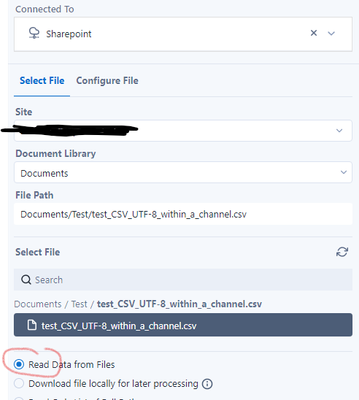
If you try to "Read Data from files", Alteryx Designer complains that it is not a valid CSV file (the file was created from Excel and saved as a CSV UTF 8 file format to preserve some of the special characters of the data).
Message:

i.e. cannot read the file directly from SharePoint within Alteryx Designer.
However, Alteryx Designer has no problems "Downloading file locally for later processing". So the workaround I found has been to first download the file, then as a separate process read the file using the standard "Input data" tool.
Whilst this works, it is painful that I have to break this into 2 discrete events, where what I want is to read the file from the Sharepoint location without downloading first. Has anyone managed to get the 'SharePoint Input" tool to work properly to "Read Data from files"?
(ps : I also tested reading a non-UTF8 CSV file from SharePoint, and for these, I get the last column of the CSV but with the heading of the first column. None of the content from the other columns are read in. Either way non-UTF8 CSV file format isn't good enough as it can't deal with special characters).
Any help appreciated.
tx


