Hi all,
I have a workflow that I created on my local designer.
The workflow takes an excel sheet from my SharePoint site, does some work, then puts the output to a Tableau server as a .hyper file.
After testing the workflow and fixing any bugs, I then pushed it to my server.
I then went to my designer on my server and ran the workflow.
It ran well...no errors. I then saved it to my server. It saved and validated successfully.
I then go to the workflow on the server via the browser, and go to run it there.
...and I get the following error....
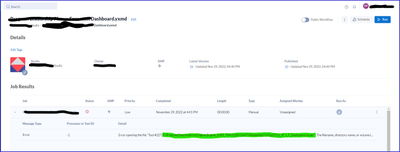
The file that it is referring to (green highlight) is a file that sits on the server, I was able to find that file with success, and saw no issues.
What is stopping me from running my file on the server thru the browser. BTW...I've tried running it manually, and thru a schedule...all with the same outcome.
Any help or insights would be greatly appreciated.
-prpatel


