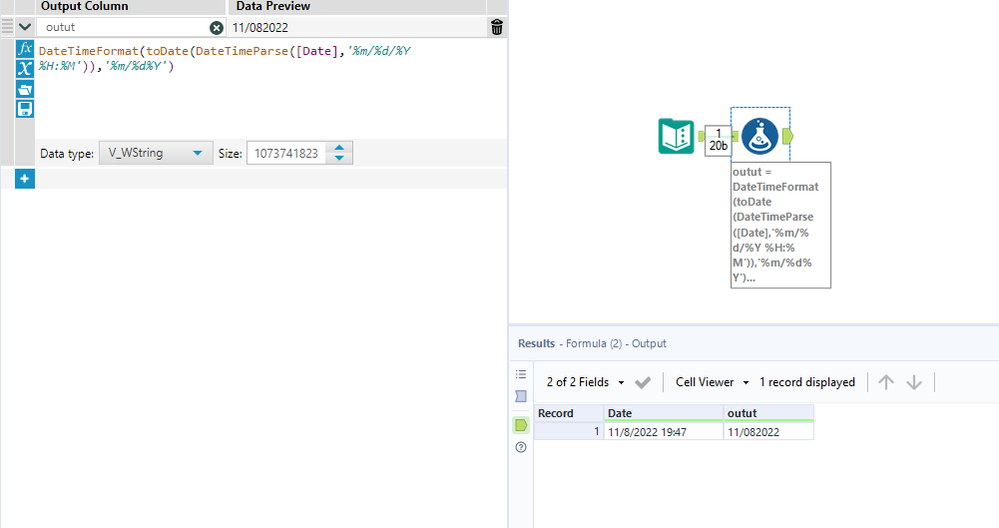
I have columns in Date time Formats.
Example: 11/8/2022 19:47
I need to change this to Date : 11/8/2022. I tried DateTimeParse formula and DateTime function but not getting any output. Help is appreciated
Hey @dheerajasia,
Do you want to remove the zero from the month column?
If your interested in learning more about the datetime functions there is a great cheat sheet Blog here: https://community.alteryx.com/t5/Engine-Works/DateTime-Functions-Cheat-Sheet/ba-p/844353
Any questions or issues please askIra WattTechnical ConsultantWatt@Bulien.com
Hi,
In my Excel, I only see Date, HH:MM as shown below
But when I am importing this file into Alteryx, it comes up in a different format and adds Seconds too.
Alteryx:
I think this is causing the formula to fail. How do I fix this and convert this DateTime to just Date?
@dheerajasia One way of doing this with the DateTimeParse function
Hi @dheerajasia
One way to have the solution as below with Regex tool.
Feel free to mark the solution of the post which helped to resolve the issue, so similar issues faced by other community members in future can be helpful to refer the solution.
Many thanks
Shanker V