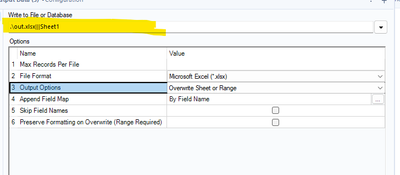
My workflow currently has 3 rows of data for 70 different States/Countries. Each Stat/Country gets its own excel file (already exists) and the 3 rows of data from my flow overwrites a specific tab (DataTable) in each excel file.
One of the columns in this data set is the exact location of each file built using formula tool (including sheet name). Connecting this formula to an output tool either will
A. Give me an error saying i need to specify a file name
B. If i add a filter to select just 1 of the 70 different States/Countries, it exports PERFECTLY
Why wont it handle the multiple excel file exports? I've had no issues with this in the past. The current workflow has 3 variations of this process and the first two worked totally fine then without any changes all 3 no longer work. Same process (column with full path). My options on output do have the "Change entire path" option selected and it is pointing to the right column.
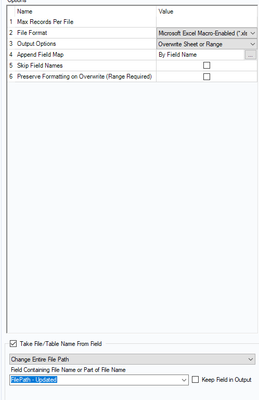
Sorry no other pictures flow contains sensitive data.