I will be using part of the training materials for illustration purpose.
Attached is the main workflow (Exercise7-macro) and also the macro file (Macro_currency_con) that i am using.
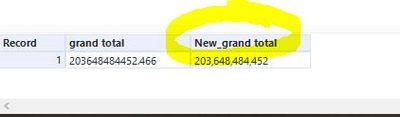
After running the main workflow , i will get the image below as final output. I have no problem with the figures, The user will select either one of the currency and the computation will return the sales amount in that currency. However i am trying to get the column name (highlighted yellow) to change to whatever a user had selected in macro (either EURO, RUPEE or BIRD) instead of just a simple prefix/suffix to the column name. Is there anyway to do it without manually changing it such as using the Select tool?
Reason being my actual data has multiple options for user to select (more than 100) so its not really viable to hardcode/manually change it.
I had tried to use Dynami Rename but cant seems to get it done.
Please advise thanks!!