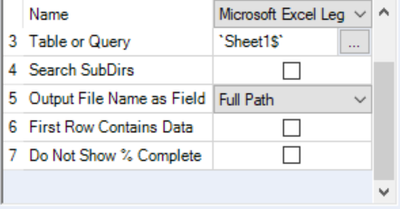
I have data in a file that looks similar to this:
| Company Name | Apple | | | |
| Total Employees | 100 | | | |
| Compensation | | | | |
| | | | | |
| | | | | |
| Name | Age | Hours | Manager1 | Manager2 |
| James | 20 | 40 | Annie | Jack |
| John | 25 | 40 | Kuldeep | Jack |
| Amy | 22 | 40 | Arthur | Albert |
I want to use the select tool to grab the following columns: Name, Hours, Manager1. However, when I try to use the tool, these headers do not show up and instead I see F1, F2, F3 etc. I want to ignore rows 1-5 and only use data from row 6 onwards,
I have tried using the "Start Data Import on Line 6" feature in the Input Data tool, but that only worked for a smaller sample size I was testing with. It disappears when I use the larger file I want to work with.