I have a workflow that runs daily and exports it's output into a preformatted Excel sheet. The sheet is located on Box and is synced with my Box cloud. I provide a link to my coworkers in my Tableau dashboard to this Box file for them to download as a monthly report.
In the past few months, I keep encountering issues periodically where it appears that the file becomes corrupted somehow and does not display any content.

If I click yes, I then receive this message.
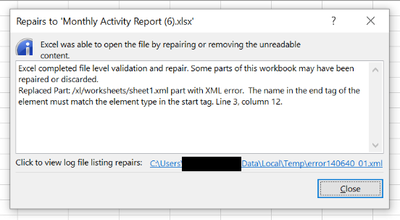
When I view the file at this point, it's blank. I have recreated the report from scratch and added it back to the workflow. It seems to work okay for a while, but eventually I start encountering this error again.
I have another report in the same workflow that is generated alongside this one, but I do not receive the same error with it. They both have headers, so the data starts on lines 2 or 3, and both have preformatted data, number and text columns. The one that I have issues with also has an image and floating text - that's the only difference I know of.
I'm not sure where the problem lies. I have created a brand new template from scratch for the workflow to feed into, and it still, eventually, has this problem. Does anyone have any ideas as to what I may be doing wrong or perhaps a better way to create and deliver this report?


