I've said it before and I'll say it again, there may be 100 ways to do any one thing in Alteryx. Using radio buttons in an analytic app is certainly no exception. The use of radio buttons can ultimately provide your end user many options within the same app, such as creating functionality for multiple input types, selecting a report style, or choosing a method to draw your trade area. The real question comes down to how to properly configure these radio buttons. The Detour Tool is an excellent option!
The Detour Tool is a relatively straight forward tool, diverting the data flow to either one side or the other. By default, if a data stream has not been chosen by the Detour Tool, that data stream will not be processed. This allows a user to create multiple scenarios for data analysis, while only processing the desired scenario, reducing processing time.
In order to properly use the Detour Tool in an analytic app, one can use multiple methods. The Alteryx Zip Package attached to this post demonstrates how to use two Radio Button Tools and only one Action Tool, reducing development time and taking advantage of the Action Tool's slick automatic selection functionality.
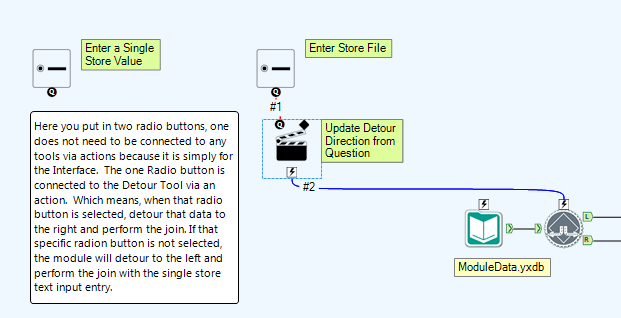
As you can see above, there is only one Action. The Detour Tool is set to one method, while allowing the single Action Tool to update the Detour Tool if the second choice is selected by the user.
For more info, download the zip package and check it out. As always, if you have any questions please don't hesitate to reach out to support@alteryx.com.
Huge thanks to Paul Treece for his help with the app. Thanks, and until next time!
Chad
Follow me on Twitter! @AlteryxChad


